

About this policy
CIBC is committed to being transparent about our digital practices. This Digital Preferences Policy explains:
- What tracking technologies are and how we use them
- How we handle the information these technologies collect
- Our sharing of this information plus other information we have about you with our advertising partners
- How you can control your preferences for the use of these technologies and the use and sharing of your information
For a more complete understanding about how and why we handle personal information, including your privacy rights and choices, review this page and visit our Privacy Policy.
How our technologies work
We use technologies, such as cookies, pixels, beacons and web analytics tools (collectively referred to as “technologies”) to collect information when you’re on CIBC.com websites, or CIBC Online Banking® or the Mobile Banking® App (collectively referred to as “sites and apps”). These technologies are small files or tools placed on your device or browser, and are used to track online activity.
In some cases, third parties may use these technologies to collect information about how you interact with our sites and apps, as well as with ads shown to you on other platforms. This helps us and our partners understand the effectiveness of our advertising and improve the relevance of the ads you see.
- How you use our sites and apps, such as pages visited and actions taken on each page, like whether you have started or completed an application with us
- If and how you interact with our ads
- Your device, IP address, browser and operating system
- Your location, interests and preferences
This information, and in some cases other information we have about you and how you use our products and services, is used by CIBC and shared with our third party partners, including advertising partners, to:
- Understand how you use our sites and apps
- Operate, improve and protect our sites and apps
- Authenticate users and prevent fraud or unauthorized activity
- Measure and report on advertising effectiveness
- Support real-time analytics and service improvements
- Promote our products and services
Our advertising partners may also combine or match the information we provide with the information they have about you and may also use the information they collect in accordance with their own privacy policies.
For more information on each of the technologies we use, refer to What are technologies and how do you use them? in the Frequently Asked Questions section below.
What we do with this information
We use the information collected from our technologies for different purposes depending on which category the information or technology falls into. Unless the technologies are Strictly Necessary, you can decide whether to provide this information by managing your preferences with CIBC.
Types of technologies
Managing your preferences with CIBC
Managing your privacy preferences with CIBC sites and apps
To maximize your choices and ensure anyone using CIBC sites or apps has these choices, we ensure you can manage your preferences regardless of whether you’re logged in.
Your choices with one set of preferences will not affect the other.
When you’re on CIBC Online or Mobile Banking
Manage your preferences from the Preferences Centre in the Settings and Security menu. Selecting “Confirm my choices” saves your preferences and applies them across your devices and browsers while you use Online or Mobile Banking. You can also manage non-essential tracking technologies at any time by selecting the “Manage digital preferences” button on this page or the “Digital Preferences Policy” link in the footer of any CIBC.com page.
To learn how, select your platform below.
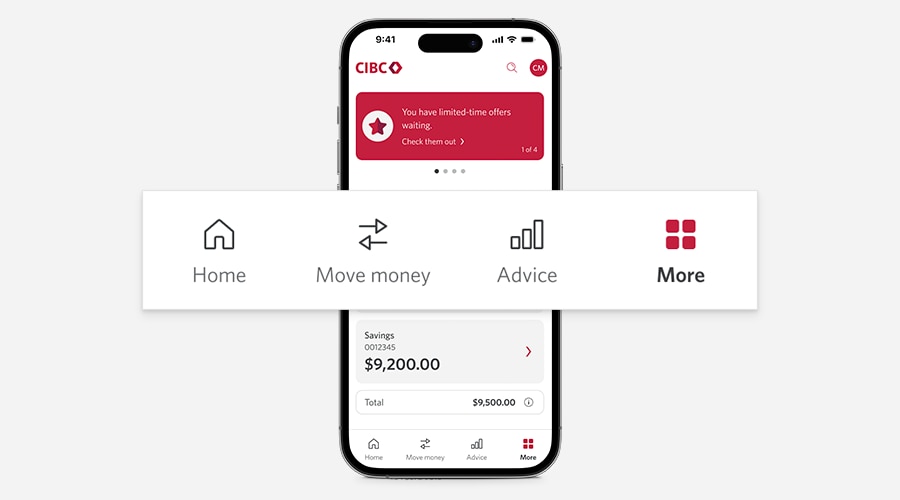
Step 1
Sign on to the mobile banking app and select “More” from the bottom menu.
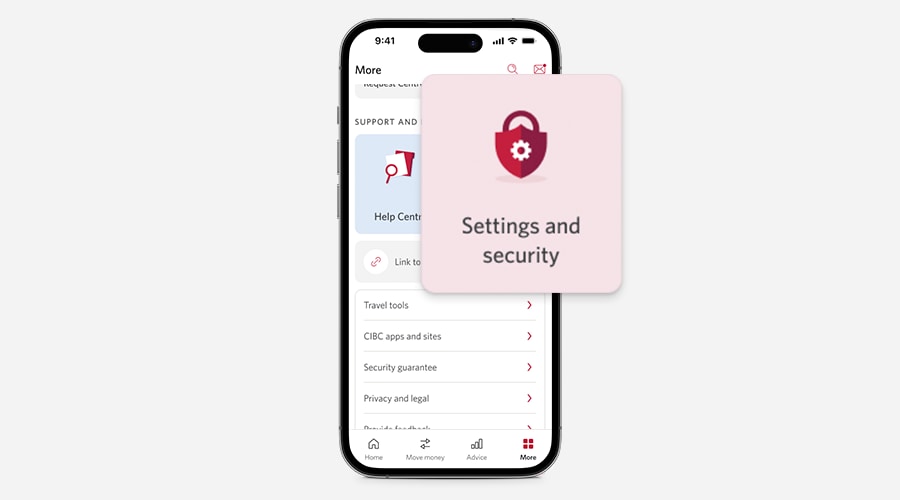
Step 2
Select “Settings & Security” from the “Support and resources” section.
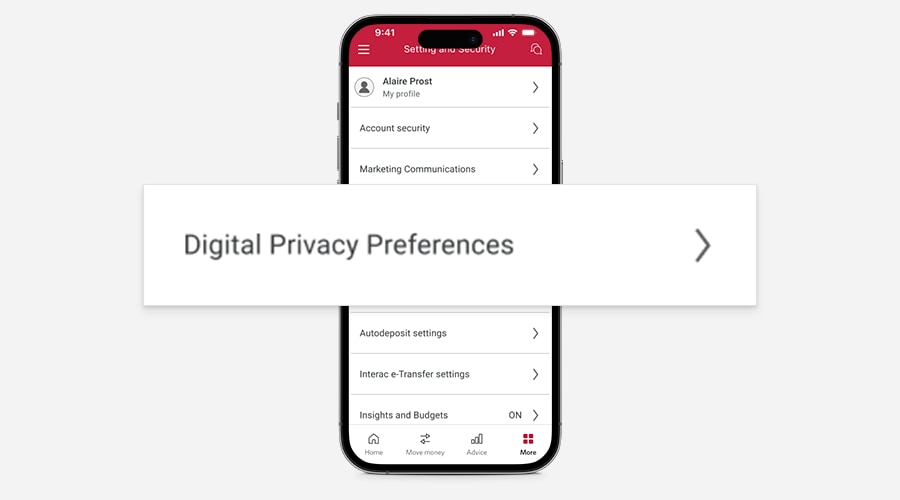
Step 3
Select “Digital Preferences” from the list of available options.
Step 1
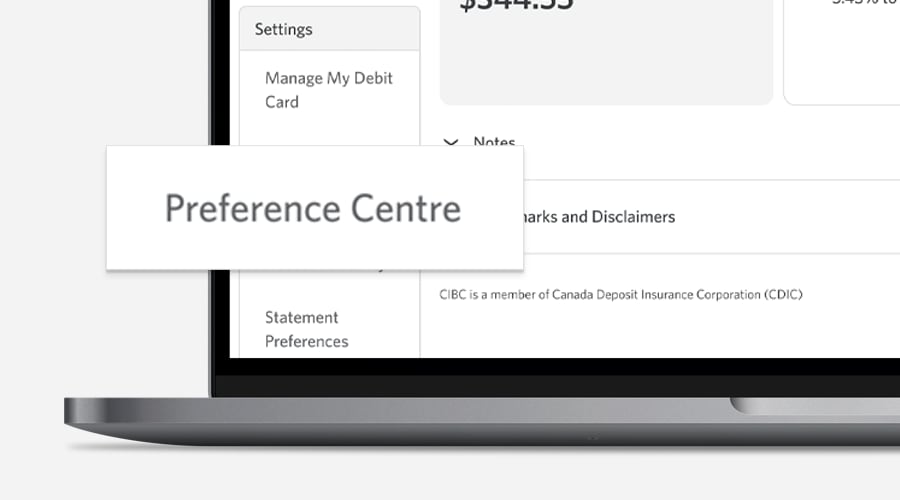
Sign on to online banking and select “Preference Centre” from the left menu bar under “Settings.”
Step 2
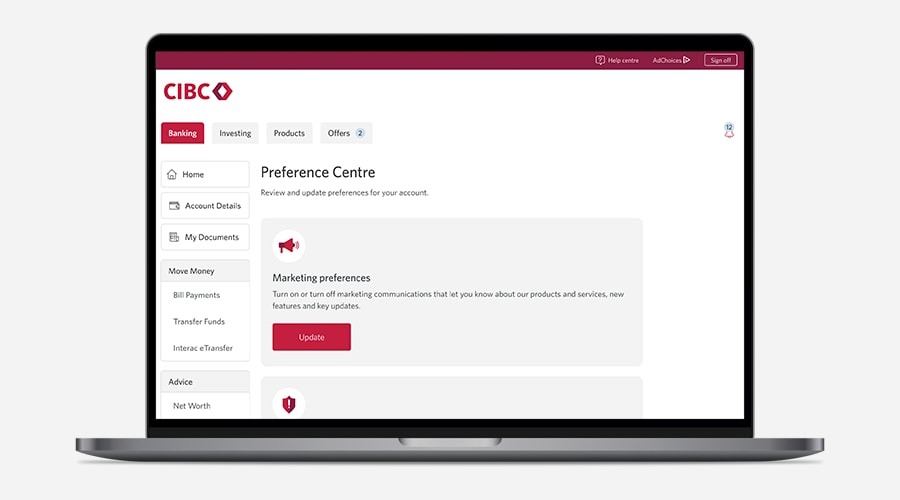
Navigate to “Digital Preferences” in the following screen and select “Update.”
Step 3
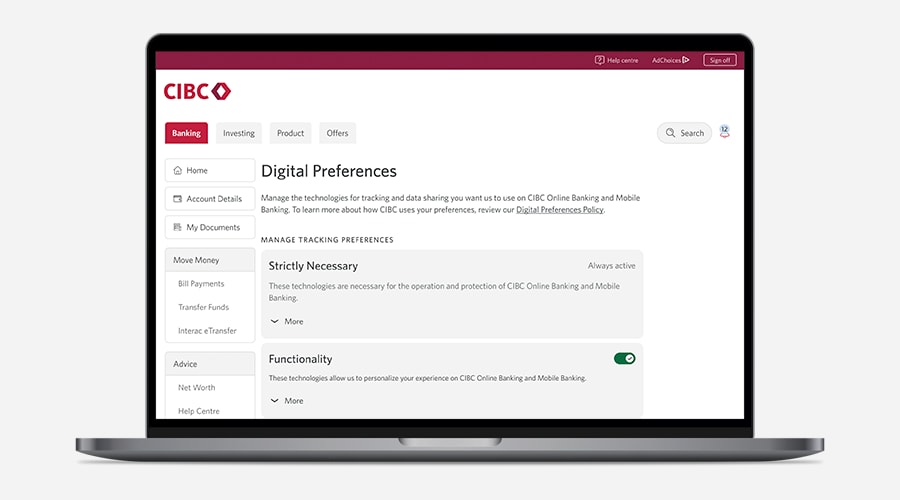
Review the different types of digital preferences and select the options you’d like to opt in or out.
When you’re on any CIBC.com website
You can select your preferences by using the “Manage digital preferences” button below. You can also manage non-essential tracking technologies at any time by selecting the “Digital Preferences Policy” link in the footer of any CIBC.com page. Your preferences will be set only for your device and browser. You will be presented with the option to revisit these preferences whenever you visit our sites using a different device or browser.
Additional consent-management tips
Your digital preferences help protect your privacy. While you can manage them directly on this page, there are additional steps you can take to ensure proper management of your personal information.
- After updating your preferences, close all CIBC domain tabs on your browser. This will ensure your preferences are properly applied across relevant CIBC tabs and pages.
- Your digital preferences can sometimes automatically expire on your browser, or they can be removed manually through your browser settings. When this happens, you’ll need to re-enter your digital preferences.
- If you’d like to take additional steps to protect your privacy as it relates to advertisements, most browsers provide guidance on managing tracking technologies. These can typically be found in the support section of your browser. For details, refer to the Browser settings section of this page.
Other app and device settings
If you have one of our mobile apps, you can also manage your privacy with additional permissions and settings on the app and your device. Your device support will have instructions for how to manage these permissions. For example, you can use settings to control when you share your location with us, or if our app can access your camera for certain functions like depositing a cheque.
Marketing communications
In addition to managing digital preferences, CIBC clients can also manage preferences related to marketing communications. Customize which CIBC marketing communications you receive across different delivery methods, including email, text and more.
Managing your preferences with third parties
Browser settings
The browser you use allows you to review some types of technologies, including cookies, and control how they are used. You can configure your browser to accept or delete technologies, either for specific technologies or all of them. You can also set your browser to ensure it refuses all tracking technologies or have it request your consent every time one is sent to your device. However, these settings could have an impact on your user experience with our online services.
To find out how to manage technologies on popular browsers, you can visit the following pages:
Google Chrome Opens a new window.
Microsoft Edge Opens a new window.
Google Analytics
We use Google Analytics to better understand your use of our website. Google Analytics collects information on user behaviour on our website, which includes how many times a user visits our website, what pages they visit, and where they were referred from. Google Analytics also collects advertising identifiers for mobile devices. Google may use the data collected for its own purposes, including to contextualize and personalize the ads of its own advertising network.
To learn more about how Google uses data collected when you visit websites that use Google Analytics, review the Google Privacy and Terms Opens a new window. page. To deactivate the Google Analytics function, visit the Google Analytics Opt-out Browser Add-on Opens a new window. page, then download and install the add-on for your web browser.
Facebook Pixel
We use Facebook Pixel to better understand your use of our website. Facebook Pixel collects information on user behaviour on our website, which includes how many times a user visits our website, what pages they visit, and where they were referred from. Facebook (including its owner, Meta) uses the data collected through technologies to track and examine the use of the website, to prepare reports on its activities, and share them with other Facebook services. Facebook may use the data collected on the websites to contextualize and personalize the ads on its own advertising network.
Learn more about how to limit the data Facebook Pixel shares and uses about you by visiting Facebook's Help Center Opens a new window.. To read more about how Facebook Pixel works, review “Information from partners” on Facebook's Data Policy Opens a new window..
AdChoices
AdChoices is a self-regulatory program that provides Canadians with greater transparency and control over the interest-based advertising they receive. It also lets them opt out of interest-based advertising from participating companies online or on their mobile device.
To learn more about this program, visit DAAC AdChoices Opens a new window.. Here, you can opt out of interest-based advertising by companies participating in the AdChoices program — including CIBC — by using the Opt-Out Tool they provide. If you opt out of interest-based advertising, you may still get CIBC advertising, but it won’t be personalized.
Turning off Advertising when managing your preferences with CIBC will disable interest-based advertising, but only from CIBC.
Frequently asked questions
We may modify or amend this Digital Preferences Policy from time to time at our discretion. When we make changes to the Digital Preferences Policy, we'll update the revision date at the top of this page, and the modified or amended Digital Preferences Policy will be effective as of that revision date. If the changes we make are significant, we’ll provide a more prominent notice and obtain consent when required by applicable laws.
We encourage you to periodically review this Digital Preferences Policy to be informed about how we're using tracking technologies.